Home / TABLETOP
TABLETOP

Connected tools for a clear way of working.

From the first order to reporting and accounting. Explore each function, understand its value to your team and check which plan includes it.

CASHIER

Cashier: keep selling

Handle dine-in, takeaway, delivery and drive-through orders, tables, split bills and payments. After activation, sales continue offline and data is sent through Sync.

Explore details →
KITCHEN

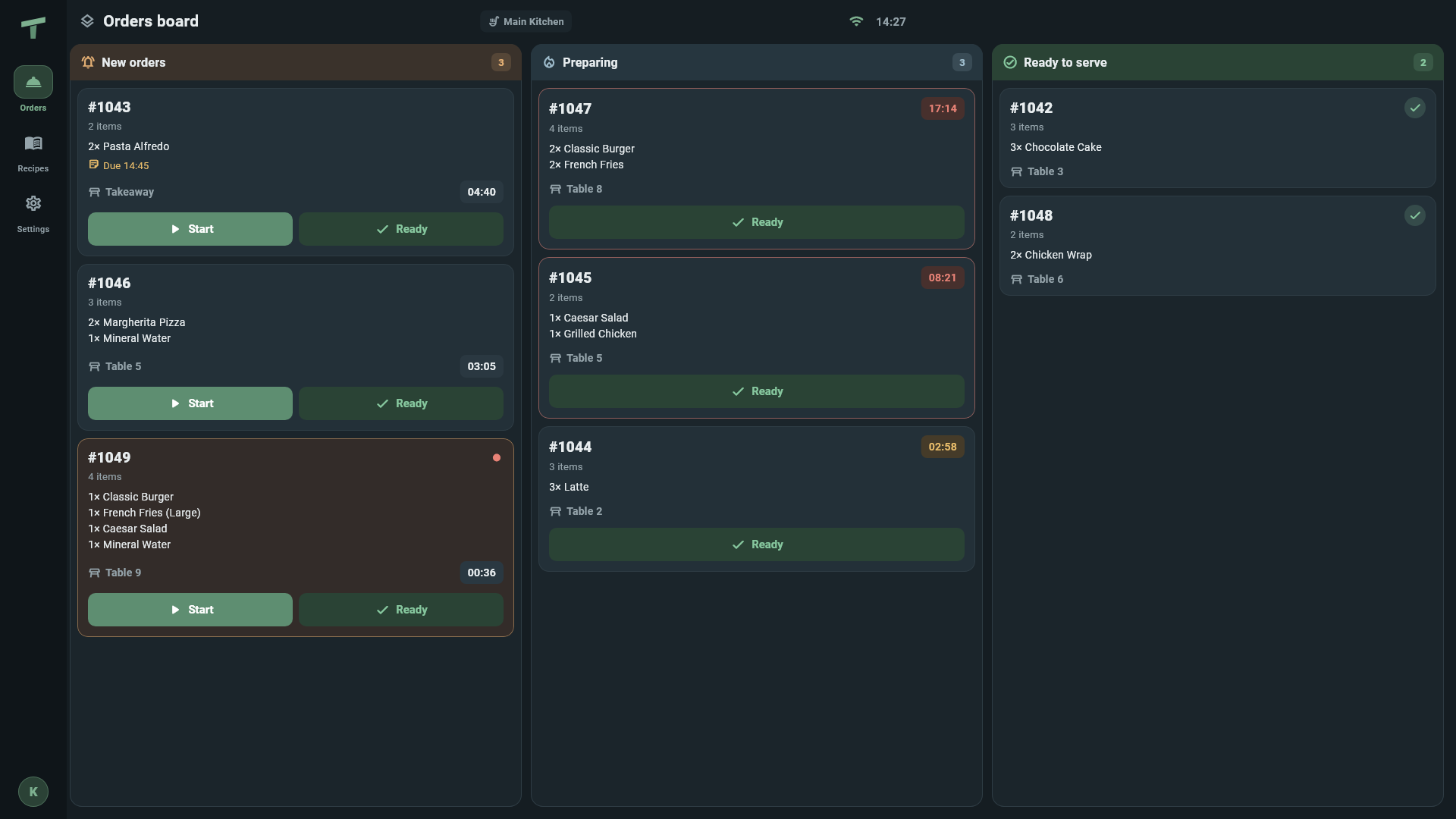
Kitchen: every order at its station

Route orders to preparation stations, display a TV order grid and show recipes to the team. Mark a product sold out to stop selling it across branch devices.

Explore details →
NOTIFIER

Notifier: ready orders seen and heard

Show ready order numbers on a dedicated screen with Arabic voice announcements.

Explore details →
QR

QR ordering: the guest’s phone joins the service

On the shop Wi-Fi, guests scan the table QR and order from the menu. Their phone rings when the order is ready. They can request a waiter, bill, water or cleaning and leave a note or rating. The flow supports continuing to a Google review.

Explore details →
INVENTORY

Inventory and recipes: see behind every plate

Link products to ingredients and quantities, and follow stock levels, purchases and counts. Manage transfers, production and warehouses according to your plan.

Explore details →
CASH-SHIFTS

Cash and shifts: every movement can be reviewed

Manage shifts, cash drawers, payments and refunds, and review end-of-day closing and driver cash.

Explore details →
REPORTS

Reports: turn operating detail into decisions

Review sales, costs, inventory and branch performance in the console using data received after Sync.

Explore details →
AI

AI Assistant: ask about your business in Arabic

Explore sales, recipe-cost and stock questions in Arabic through the TableTop AI Assistant.

Explore details →
ACCOUNTING

Accounting: the financial picture in one place

Chart of accounts, journals, general ledger, trial balance, profit and loss, and balance sheet in Pro.

Explore details →
LOYALTY

Loyalty: a reason for the next visit

Manage points, stamps, gift cards, discounts, promotions and coupons. After a QR order, guests can be offered a Google Wallet loyalty card.

Explore details →
TEAM

Team: permissions that match responsibility

Roles built from 111 permissions, PIN sign-in and attendance through fingerprint devices.

Explore details →
BRANCHES

Branches: central management, local operation

Manage menus, staff, inventory and reports through a multi-branch console. Branch tills share work over the local network with automatic leader failover.

Explore details →

Operations and service

CASHIER

Cashier: keep selling

Handle dine-in, takeaway, delivery and drive-through orders, tables, split bills and payments. After activation, sales continue offline and data is sent through Sync.

Your team can keep selling through an internet outage.

Cashier illustration on a selling device
KITCHEN

Kitchen: every order at its station

Route orders to preparation stations, display a TV order grid and show recipes to the team. Mark a product sold out to stop selling it across branch devices.

Clearer preparation and direct coordination with tills.

Kitchen Display in English: orders and preparation stations
Kitchen Display — English interface
NOTIFIER

Notifier: ready orders seen and heard

Show ready order numbers on a dedicated screen with Arabic voice announcements.

A clear signal for organised order collection.

QR

QR ordering: the guest’s phone joins the service

On the shop Wi-Fi, guests scan the table QR and order from the menu. Their phone rings when the order is ready. They can request a waiter, bill, water or cleaning and leave a note or rating. The flow supports continuing to a Google review.

Service requests and order status stay closer to guests and staff.

Control and costs

INVENTORY

Inventory and recipes: see behind every plate

Link products to ingredients and quantities, and follow stock levels, purchases and counts. Manage transfers, production and warehouses according to your plan.

Clearer costs and structured ingredient-use reviews.

CASH-SHIFTS

Cash and shifts: every movement can be reviewed

Manage shifts, cash drawers, payments and refunds, and review end-of-day closing and driver cash.

A clear basis for reconciling payments and reviewing differences.

REPORTS

Reports: turn operating detail into decisions

Review sales, costs, inventory and branch performance in the console using data received after Sync.

Know which figures are available before making a decision.

Management and growth

AI

AI Assistant: ask about your business in Arabic

Explore sales, recipe-cost and stock questions in Arabic through the TableTop AI Assistant.

An easier way to understand your restaurant’s data.

ACCOUNTING

Accounting: the financial picture in one place

Chart of accounts, journals, general ledger, trial balance, profit and loss, and balance sheet in Pro.

Connect operational review with accounting review.

LOYALTY

Loyalty: a reason for the next visit

Manage points, stamps, gift cards, discounts, promotions and coupons. After a QR order, guests can be offered a Google Wallet loyalty card.

Tools that support an ongoing customer relationship.

Google Wallet loyalty card
TEAM

Team: permissions that match responsibility

Roles built from 111 permissions, PIN sign-in and attendance through fingerprint devices.

Clearer responsibilities and appropriate access for each role.

BRANCHES

Branches: central management, local operation

Manage menus, staff, inventory and reports through a multi-branch console. Branch tills share work over the local network with automatic leader failover.

A repeatable operating approach with central visibility after Sync.

See the idea

Illustration
Illustrative promotional video

Illustration
Illustrative promotional video

Find the tools that fit your restaurant’s priorities.